HI! I'm just begin to run the sample android_tutorial_cv_bridge_image and I got some problems.
I have already followed the tutorials to build the environment for rosjava.
Here I want to play a ROS bag file with topic /image_raw and run the app cv bridge image on my phone (Samsung Galaxy J7 Pro) to show the converted video stream.
All I have changed in the MainActivity.java is the topic name which is /camera/image/raw originally. Just like below:
@Override
public void onStart(ConnectedNode connectedNode) {
    this.node = connectedNode;
    final org.apache.commons.logging.Log log = node.getLog();
    imagePublisher = node.newPublisher("/image_converter/output_video/raw", Image._TYPE);
    imageSubscriber = node.newSubscriber("/image_raw", Image._TYPE);
    imageSubscriber.addMessageListener(new MessageListener<Image>() {
        @Override
        public void onNewMessage(Image message) {
            CvImage cvImage;
            try {
                cvImage = CvImage.toCvCopy(message, ImageEncodings.RGB8);
            } catch (Exception e) {
                log.error("cv_bridge exception: " + e.getMessage());
                return;
            }
            Log.i(TAG, Integer.toString(cvImage.image.cols()));
            Log.i(TAG, Integer.toString(cvImage.image.rows()));

            //make sure the picture is big enough for my circle.
            if (cvImage.image.rows() > 110 && cvImage.image.cols() > 110) {
                //place the circle in the middle of the picture with radius 100 and color red.
                Imgproc.circle(cvImage.image, new Point(cvImage.image.cols() / 2, cvImage.image.rows() / 2), 100, new Scalar(255, 0, 0));
            }

            cvImage.image = cvImage.image.t();
            Core.flip(cvImage.image, cvImage.image, 1);

            bmp = Bitmap.createBitmap(cvImage.image.cols(), cvImage.image.rows(), Bitmap.Config.ARGB_8888);
            Utils.matToBitmap(cvImage.image, bmp);
            runOnUiThread(displayImage);

            Core.flip(cvImage.image, cvImage.image, 1);
            cvImage.image = cvImage.image.t();

            try {
                imagePublisher.publish(cvImage.toImageMsg(imagePublisher.newMessage()));
            } catch (IOException e) {
                log.error("cv_bridge exception: " + e.getMessage());
            }
        }
    });
    Log.i(TAG, "called onStart");
}
I played the bag file in my host computer with ROS_IP setting to 192.168.x.x and my app can successfully connect to the address.
However the imageView still shows nothing and
Log.i(TAG, Integer.toString(cvImage.image.cols()));,
Log.i(TAG, Integer.toString(cvImage.image.rows()));
has no info output.
It seems that the MessageListener didn't work and no message is received.
Did I miss something? Hope there's someone can help me! Thanks!
Below is my gradle file:
- build.gradle(Module: android_extras.cv_bridge)
apply plugin: "com.android.library"

//noinspection GroovyAssignabilityCheck
dependencies {
    compile "org.ros.rosjava_core:rosjava:[0.3,0.4)"
    compile "org.ros.rosjava_messages:sensor_msgs:[1.12,1.13)"
    compile "com.github.rosjava.rosjava_extras:image:[0.3,0.4)"
    compile group: 'org.opencv', name: 'openCVLibrary', version: '3.4.0'
    compile "org.ros.rosjava_messages:std_msgs:[0.5.11,0.6)"
    compile "io.netty:netty:3.5.2.Final"
    compile 'org.ros.rosjava_messages:geometry_msgs:[1.12, 1.13)'
    compile 'org.ros.rosjava_messages:diagnostic_msgs:[1.12, 1.13)'
    compile 'org.ros.rosjava_bootstrap:message_generation:[0.3, 0.4)'
    compile "org.apache.commons:com.springsource.org.apache.commons.logging:[1.1.1,1.2)"
    compile "org.ros.rosjava_messages:sensor_msgs:[1.12, 1.13)"
}

android {
    defaultConfig {
        minSdkVersion 16
    }
}
- build.gradle(Module: android_extras.android_tutorial_cv_bridge_image)
apply plugin: 'com.android.application'

//noinspection GroovyAssignabilityCheck
dependencies {
    compile 'org.ros.android_core:android_core_components:[0.4,0.5)'
    compile project(":cv_bridge")
}

android {
    defaultConfig {
        minSdkVersion 16
        //noinspection OldTargetApi
        targetSdkVersion 28
    }
}
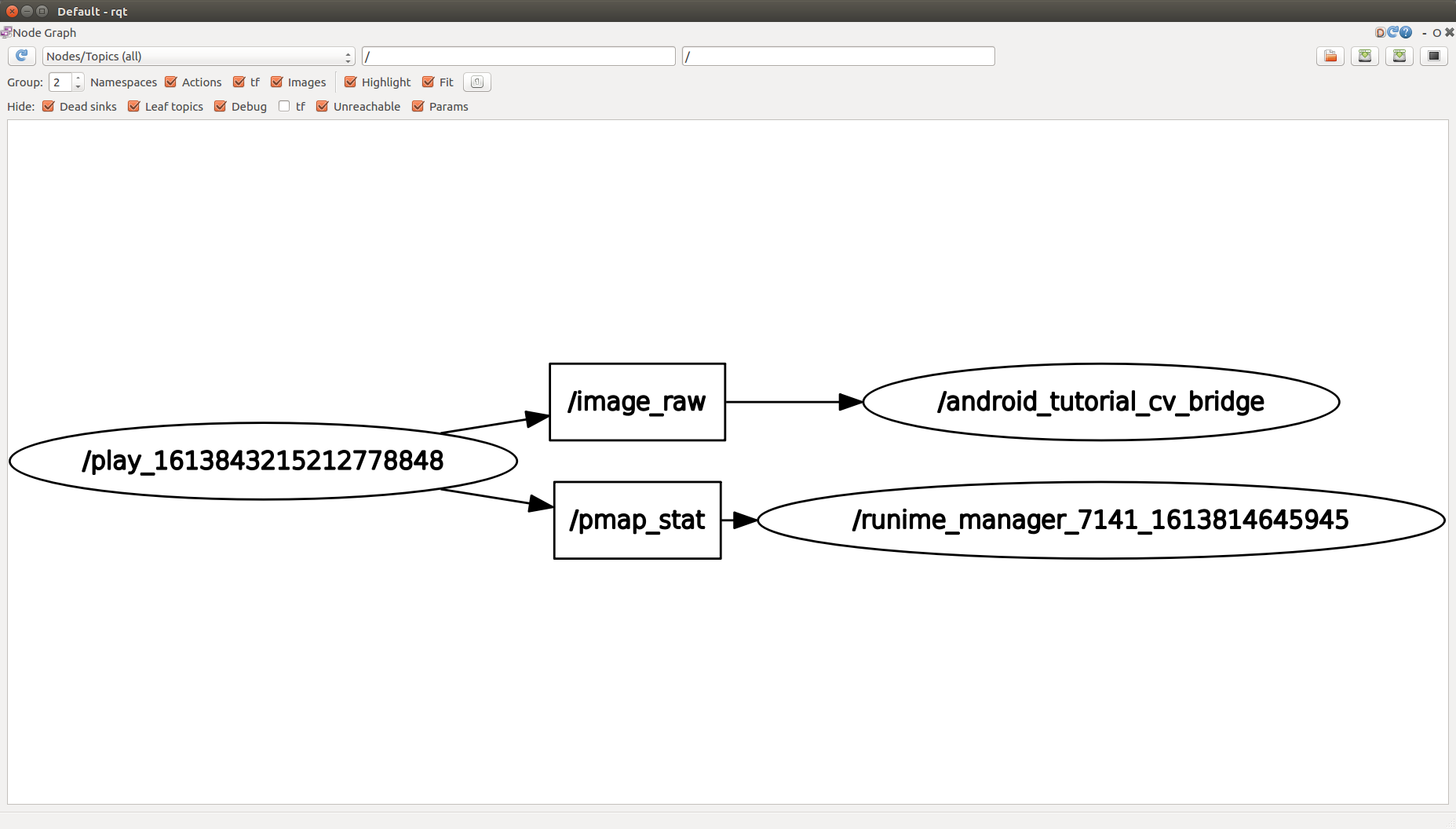
And the RQT graph:
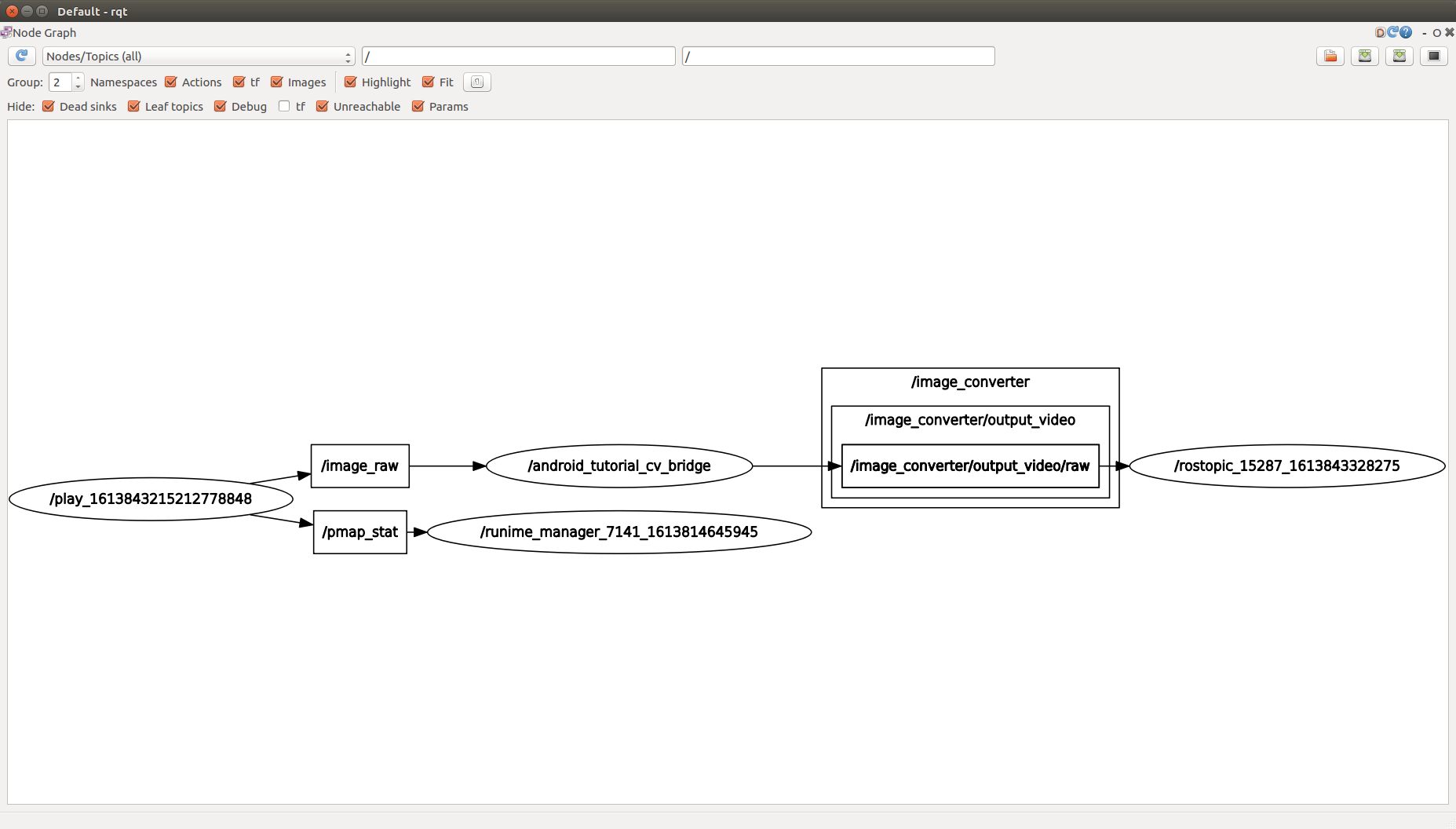
when I run rostopic echo /image_converter/output_video/raw:

HI! I'm just begin to run the sample
android_tutorial_cv_bridge_imageand I got some problems.I have already followed the tutorials to build the environment for rosjava.
Here I want to play a ROS bag file with topic
/image_rawand run the app cv bridge image on my phone (Samsung Galaxy J7 Pro) to show the converted video stream.All I have changed in the
MainActivity.javais the topic name which is/camera/image/raworiginally. Just like below:I played the bag file in my host computer with
ROS_IPsetting to192.168.x.xand my app can successfully connect to the address.However the imageView still shows nothing and
Log.i(TAG, Integer.toString(cvImage.image.cols()));,Log.i(TAG, Integer.toString(cvImage.image.rows()));has no info output.
It seems that the MessageListener didn't work and no message is received.
Did I miss something? Hope there's someone can help me! Thanks!
Below is my gradle file:
And the RQT graph:
when I run
rostopic echo /image_converter/output_video/raw: