This Angular 16 iPart demonstrates how to call the iMIS API via the @advsol/core npm package.
Run ng build to build the project. The build artifacts are stored in the dist/ directory. Use the --deployUrl flag when running ng build to ensure the correct asset paths for deployment in iMIS:
For CDN style deployment:
ng build --deployUrl=https://[SLD.FLD]/[folder]
For zip style deployment:
ng build --deployUrl=~/iPartSource/[zipfileName]/[foldername]
index.html is the entry point for your iPart
Do the following to configure the iPart in iMIS:
- Log into iMIS as a Staff user.
- Go to: RiSE > Maintenance > Content types.
- Click New > Content-Type.
- Select Client-based (preferred).
- Complete the required fields (Name, Description, and the first URL field). Use the URL to your hosted iPart.
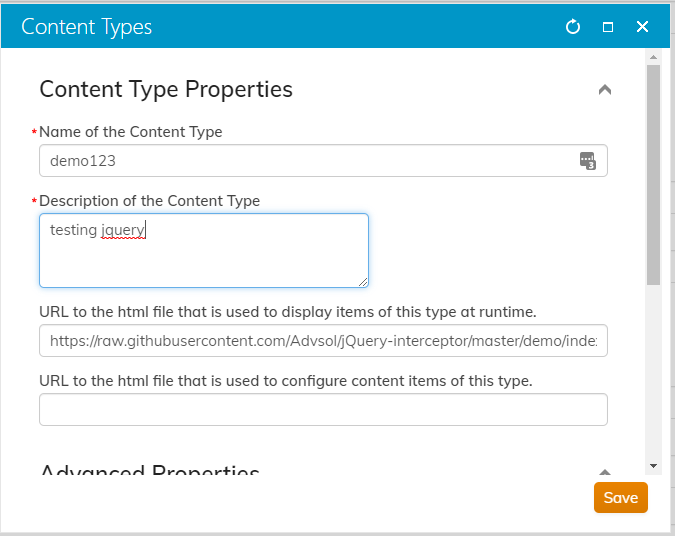
- Save the iPart/Content Type.
Create a piece of content in RiSE and add your iPart to that content:
- As a staff user, go to: RiSE > Page Builder > Manage content.
- Click New > Website Content
- Fill out the required fields and make sure to check Create navigation on publish:
- Select the location in the Navigation menu for your new content.
- Click Save & Publish.
- use
ng newto create a new Angular project.
Edit the index.html file and remove everything except the Angular componet tag, e.g.
<app-root></app-root>- Install the NPM package using
npm install @advsol/core - Follow the instruction on how to use @advsol/core or copy the examples in the
src/appfolder - Follow the instructions above on how to build, using
--deployUrl - For URL/CDN style deployment, you can either publish to your external hosting, or make sure your paths match a webserver running on your local machine (as long as you have provided access to it, through your firewalls)
- Follow the
Testing your iPartinstructions above to deploy your new iPart.