Repository navigation
data/downloaddata.sh deletes invalid zip files due to invalid checksum comaprison #6
Description
Activity
Very sorry for the delay in responding.
Thank you for the issue, but the problems did not occur in my environment.- The reconstruction code should work without decoded features of pooling layers. I could have run the code without any error. Actually, we didn't use features from pooling layers in the analysis (we shared them from subject S1 only for some auxiliary reason). It's strange that the lack of pooling files caused such an error. Could you share more details, including the error message you got?
- I ran the data downloading script on my computer but did not get the checksum error. All files we have shared were correctly downloaded. I'm not sure what's going on, but could you try re-downloading everything?
Currently cannot reproduce the first bullet. My code was a modified version due to difficulty with Python 2.7 and Caffe.
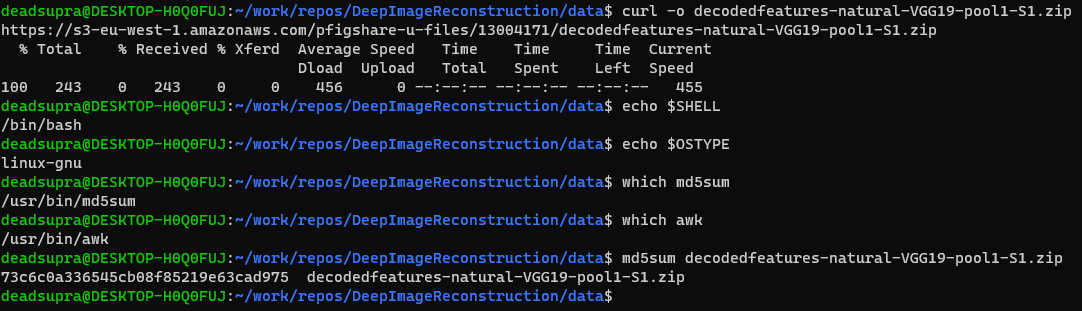
Here is the typed out command:
The checksum on the
file.csvlists it asd0a7dec4f637cc9e93e32ec5797c276fwhich doesn't match.For the same feature but pool2 of S1, I received a bad compare (see the echo in the image) but when typed out manually, it was correct (see image with md5sum typed).
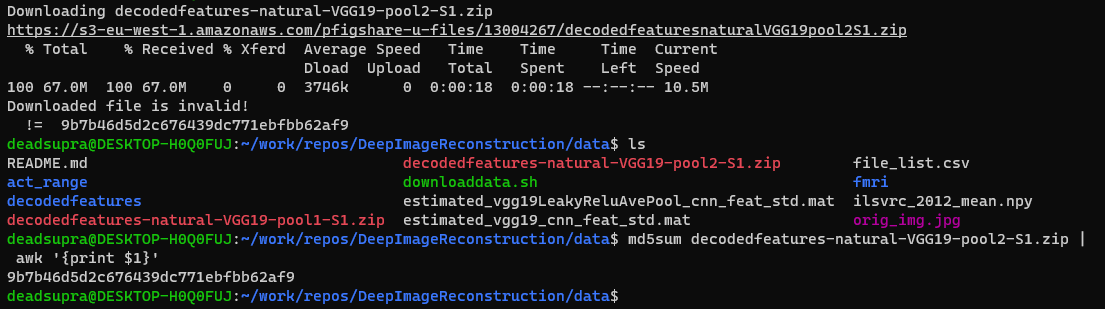
Some of the checksums registered by the bash script save a '\r' at the end.
checksum=$(echo $line | cut -d, -f3)was changed to
checksumTemp=$(echo $line | cut -d, -f3)
checksum=$(echo $checksumTemp |tr -d '\r')
echo -e "checksum in file:    |${checksum}|"
This fixed one of the compares.
I'm now able to reproduce the problem you faced.
The cause was a return code on Windows PC (This problem does not occur on the Linux system).
As you pointed out, you have to remove '\r' from all shell scripts and text files as follows:sed -i -e 's/\r//g' data/downloaddata.sh sed -i -e 's/\r//g' data/file_list.csv sed -i -e 's/\r//g' data/fmri/download.sh sed -i -e 's/\r//g' net/downloadnet.shBy running the above command, I can successfully download all models and decoded features and pass the check-sum in my environment.
Note that sometimes downloading fails or stops accidentally because the file size is very large. If so, please remove the failed file and retry downloading again.


Hello,
I was having issues loading the decoded features in python. I traced the issue with one of the MATLAB files not being present. The first file to trigger this was
data\decodedfeatures\natural\VGG19\pool1\S2\VC\natural-VGG19-pool1-S2-VC-Img0002.matwhen running2_reconstruct_natural_image_without_DGN.py.No data was present for subject 2 or 3 in either of the pools (for natural images).
I reran the download script,
data/downloaddata.sh, and noticed the script printed the error ofDownloaded file is invalid!.Since the script grabs the checksum from the local
file_list.csv, I believe either the checksums in that file need to be updated.I commented out the error exit:
exit 1from checksum compare (line 45) in order to inspect the zip and file and data myself. The zip files only contained S1 decoded features.Thank you