

NaughtyAttributes is an attributes extension for the Godot Inspector.
It expands the range of things you can say about an exported property, so that you can build powerful inspectors without writing an EditorInspectorPlugin or an EditorProperty of your own. Conditional visibility, value clamping, validation messages, help boxes and custom widgets are all written inline, next to the property they describe.
It's built as a GDExtension in Rust, and it is aimed at GDScript users.
NaughtyAttributes requires Godot 4.6 or later versions.
The addon ships prebuilt binaries for Windows x86_64, Linux x86_64 and macOS (universal), so there is nothing to compile and no Rust toolchain to install.
- The addon is available in the Asset Store.
- Alternatively, download the latest zip from the Releases page and copy
addons/naughtyattributes/into your project.
There is no checkbox in Project Settings → Plugins, and that is not a bug. GDExtension classes register themselves when the library loads, so the addon is active as soon as the editor restarts. There is nothing to enable.
GDScript has no user-definable annotations, so attributes are written as strings in the hint text of @export_custom, separated by ;
@export_custom(PROPERTY_HINT_NONE, "min_value:0; max_value:100")
var health: int = 50
An attribute's arguments follow a :, and multi-argument attributes separate them with ,
@export_custom(PROPERTY_HINT_NONE, "min_max_slider:0,100")
var damage_range: Vector2
Everything after the first : belongs to the attribute, so a condition can contain colons and commas of its own.
The first argument of
@export_custommust bePROPERTY_HINT_NONE. A hint text is parsed only when the property carries no built-in hint; any other hint is passed through to Godot untouched.
; separates attributes and , separates arguments. Escape them as \; and \\, - the double backslash is GDScript's, which rejects \, inside a string literal.
Attributes that take their text whole (info_box, warning_box, error_box and label) need no comma escaping at all.
Conditions are expressions evaluated against the edited object. Reading properties and comparing enum values works on an ordinary script:
extends Node

@export
var is_immortal: bool

@export_custom(PROPERTY_HINT_NONE, "show_if:!is_immortal")
var health: int = 100
Calling a method requires @tool on your script. Without it the editor gives the script a placeholder instance, which holds values but has no methods:
@tool # required for method calls in attributes
extends Node

@export_custom(PROPERTY_HINT_NONE, "show_if:is_at_max_health()")
var at_max_health: String = ""


func is_at_max_health():
	return self.health >= self.max_health
Expressions are Godot's own Expression class, so comparisons, !, parentheses, and/or (and their &&/|| spellings), constants and enum values all work:
@tool # required for method calls in attributes
extends Node

@export
var is_immortal: bool
@export
var max_health: int = 100
@export
var health: int = 100

@export_custom(PROPERTY_HINT_NONE, "show_if:is_at_max_health() || is_immortal")
var unbreakable: String = ""


func is_at_max_health():
return self.health >= self.max_healthBuilt-in hints are re-encoded rather than reimplemented, and handed to Godot's native editor untouched. That lets a built-in and an attribute share the one hint text slot:
@export_custom(PROPERTY_HINT_NONE, "range:0,10,0.1; show_if:is_ranged")
var spread: floatrange, enum, flags, multiline, resource_type, node_type, dir, file and the rest behave exactly as their @export_* equivalents.
This also matters for reference properties. A plain @export var icon: Texture2D already carries a hint, so it cannot carry attributes. Re-encode the picker and the attribute rides along:
@export_custom(PROPERTY_HINT_NONE, "resource_type:Texture2D; require:icon")
var icon: Texture2DDecorator attributes draw something extra above a property, instead of replacing the way the property itself is drawn.
Unlike drawer attributes, a property can have any number of decorator attributes, and they can be combined with a drawer attribute. They stack in written order.
A decorator hides together with the property it decorates, so a property hidden by
show_if/hide_iftakes its decorators with it. A property merely disabled byenable_if/disable_ifkeeps them lit.
Draws a horizontal line above the property, to separate it from what comes before.
It takes an optional hex color, with or without alpha. The default follows the editor theme - it is the color of Godot's own category bars, so it tracks the theme you are using.
extends Node3D

@export_custom(PROPERTY_HINT_NONE, "horizontal_line")
var default: int = 0

@export_custom(PROPERTY_HINT_NONE, "horizontal_line:#e06c75")
var red: int = 0

@export_custom(PROPERTY_HINT_NONE, "horizontal_line:#98c379")
var green: int = 0

@export_custom(PROPERTY_HINT_NONE, "horizontal_line:#61afef")
var blue: int = 0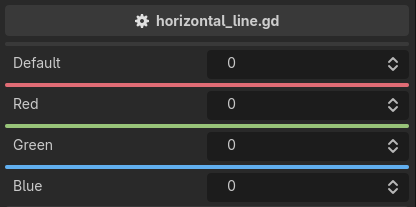
The color is a literal, not an expression. Decorations are built once, when the inspector is built, so a color read from a property would be stale forever.
Used for providing additional information.
extends Node3D

@export_custom(PROPERTY_HINT_NONE, "info_box:Information about this property")
var info: int = 0

@export_custom(PROPERTY_HINT_NONE, "warning_box:Hmm, something here looks off")
var warning: int = 0

@export_custom(PROPERTY_HINT_NONE, "error_box:This value breaks the build")
var error: int = 0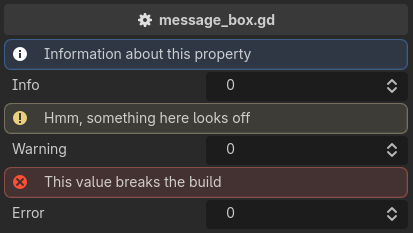
The message takes the rest of the entry whole, so prose commas need no escaping. Only a
;has to be written as\;.
The message is a literal, and the box is drawn whatever the property holds. For a message that appears only when something is wrong with the value, use require.
Drawer attributes replace the property's widget with one of their own.
A property can have only one drawer attribute. If it has more, the last one wins and the others are reported as errors.
A drawer combines freely with the other families. Decorators still draw above the property, metas still hide, grey out and relabel it, and validators still run on its value.
Provides an interface for dropdown value selection.
The option list is an expression, so it can name a property, a dictionary literal, or a method call - and it re-evaluates, so a list that reads another property follows it.
@tool # required for method calls in attributes
extends Node3D

const LEFT: Vector2 = Vector2(-1.0, 0.0)
const RIGHT: Vector2 = Vector2(1.0, 0.0)
const UP: Vector2 = Vector2(0.0, -1.0)
const DOWN: Vector2 = Vector2(0.0, 1.0)

@export
var titles: Array[String] = ["Novice", "Adept"]

@export_custom(PROPERTY_HINT_NONE, "dropdown:titles")
var title: String = "Novice"

@export_custom(PROPERTY_HINT_NONE, "dropdown:{'Warrior': 0, 'Archer': 1, 'Cleric': 2}")
var class_type: int = 0

@export_custom(PROPERTY_HINT_NONE, "dropdown:get_directions()")
var direction: Vector2 = LEFT


func get_directions():
	return {
		"Left": LEFT,
		"Right": RIGHT,
		"Up": UP,
		"Down": DOWN,
	}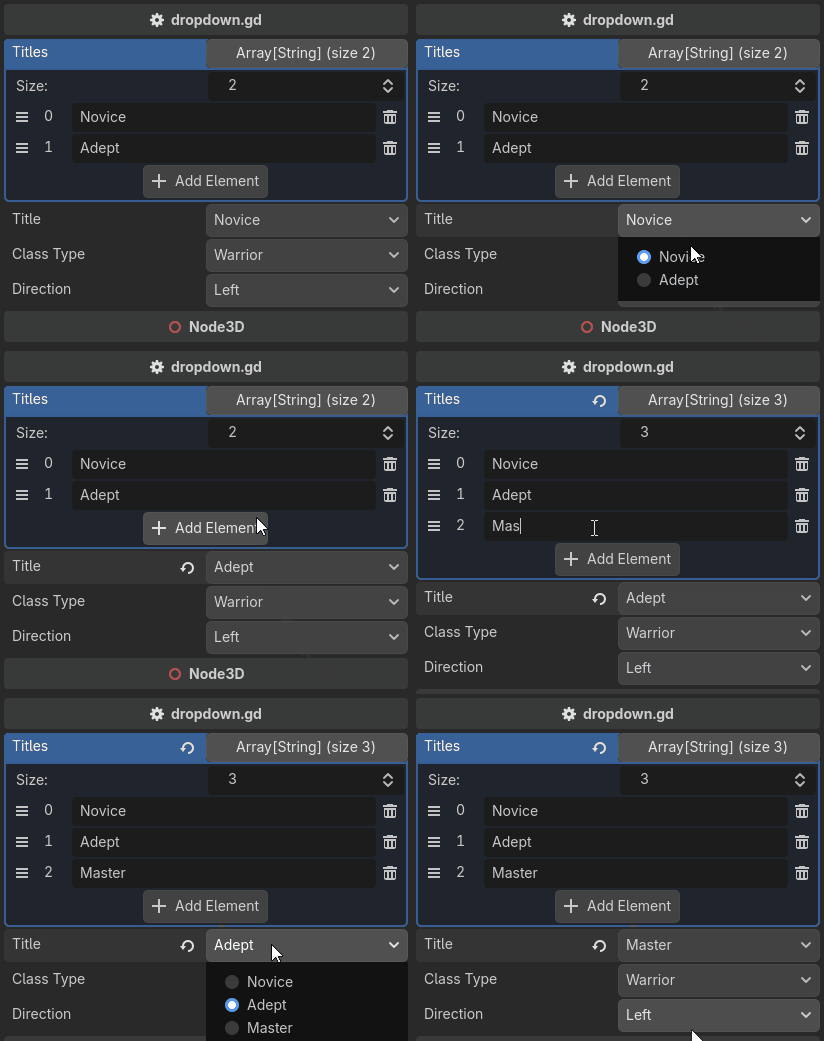
An Array uses each element as both the label and the value. A Dictionary uses the key as the label and the value as the value, which is what lets the options carry a type the label could not spell, such as a Vector2.
Every option must be assignable to the property: the same type,
int↔float,String↔StringName, ornullfor an object property. One option that is not rejects the whole list by name, and the property falls back to a widget that works.
A stored value that matches none of the options is shown as
{value} (not an option)until you pick a real one. The widget never writes on your behalf - correcting a value is a validator's job, not a drawer's.
This cannot be done with the built-in enum hint, whose list is baked into the property at build time.
Provides a checkbox interface for setting enum flags on an int property.
Unlike the built-in @export_flags, which takes string literals, it takes the enum itself, so the names and the values follow the declaration and a rename cannot leave it stale.
extends Node3D

enum DamageType { FIRE = 1, ICE = 2, WIND = 4 }

# Takes the enum itself, so the names and values follow the declaration.
@export_custom(PROPERTY_HINT_NONE, "enum_flags:DamageType")
var naughty_damage_type: int = DamageType.FIRE | DamageType.ICE

# The built-in annotation accepts only string literals, which a rename leaves stale.
@export_flags("FIRE:1", "ICE:2", "WIND:4")
var builtin_damage_type: int = DamageType.FIRE | DamageType.ICE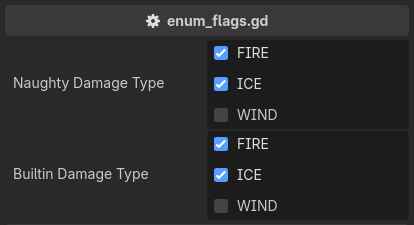
The widget is Godot's own flags editor, handed the names and values read from the enum, so it behaves exactly like @export_flags in every other respect. The checkbox text is the enum name verbatim, and a member without an explicit value gets 1 << index.
The enum is not sanity-checked beyond what only this attribute can know - a declared name, an
intproperty, and int values. ANONE = 0member is an inert always-checked box and a combinedALL = 7member is a set-all box, the same as with the built-in.
A double slider. The min value is saved to the x component and the max value to the y component of a Vector2 or Vector2i property.
Both bounds are expressions, so a bound can be a literal, another property, or a method call, and the slider follows it when it changes.
@tool # required for method calls in attributes
extends Node3D

@export
var max_hp: int = 100
@export
var max_stamina: int = 50

@export_custom(PROPERTY_HINT_NONE, "min_max_slider:0,max_hp")
var hp: Vector2 = Vector2(10, 50)
@export_custom(PROPERTY_HINT_NONE, "min_max_slider:0,get_max_stamina(50)")
var stamina: Vector2 = Vector2(10, 40)
@export_custom(PROPERTY_HINT_NONE, "min_max_slider:0,10")
var damage: Vector2 = Vector2(2, 8)
@export_custom(PROPERTY_HINT_NONE, "min_max_slider:1,60")
var level: Vector2i = Vector2i(20, 40)


func get_max_stamina(bonus_stamina: int):
	return self.max_stamina + bonus_stamina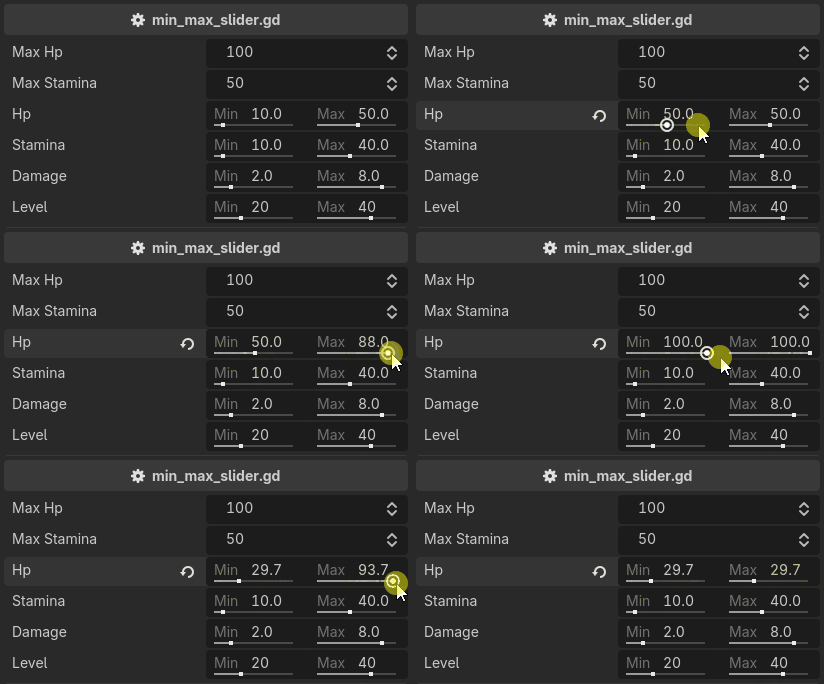
The attribute takes both bounds, in that order:
min_max_slider:{min},{max}. Applied to anything other than aVector2or aVector2i, it reports an error and the property falls back to its default widget.
Give properties meta data. A property can have more than one meta attribute.
A meta attribute draws nothing of its own. It answers a question about the property - is it visible, is it editable, what is it called, who should be told when it changes - and several conditions on one property are ANDed.
Shows or hides the property, along with any decorators above it, based on some condition.
The condition is an expression evaluated against the edited object, so it can read a property, compare an enum value, or call a method.
@tool # required for method calls in attributes
extends Node3D

enum WeaponType { MELEE, RANGED, MAGIC }

@export
var is_immortal: bool = false

@export
var weapon_type: WeaponType = WeaponType.MELEE

@export_custom(PROPERTY_HINT_NONE, "show_if:weapon_type == WeaponType.MELEE")
var melee_class: String = "class_name"

@export_custom(PROPERTY_HINT_NONE, "show_if:!is_immortal")
var health: int = 100

@export_custom(PROPERTY_HINT_NONE, "hide_if:!is_at_max_health()")
var at_max_health: String = ""


func is_at_max_health():
	return self.health >= self.max_health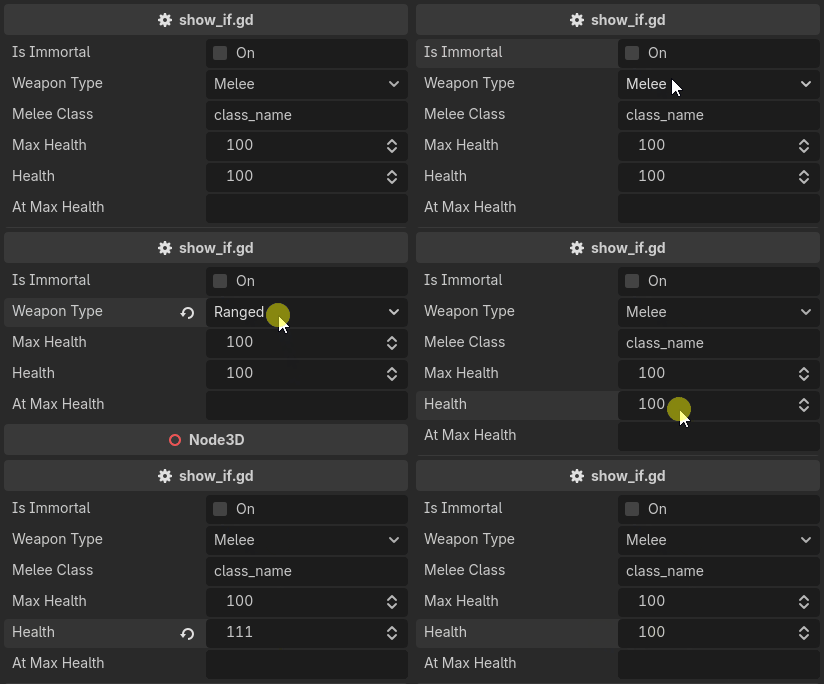
hide_if is show_if with the condition negated. The two are the same attribute written from either side.
You can have more than one condition. They are ANDed, and &&, ||, ! and parentheses are available inside a single condition as well:
@export_custom(PROPERTY_HINT_NONE, "show_if:flag_0; show_if:flag_1")
var show_if_all: int = 0

@export_custom(PROPERTY_HINT_NONE, "show_if:flag_0 || flag_1")
var show_if_any: int = 0
A condition that fails to evaluate counts as satisfied, so a property never disappears because of a typo. The failure is reported instead.
Validators do not run on a hidden property, and its message bubble hides with it.
Greys the property out and refuses input, based on some condition. The condition is written exactly as for show_if / hide_if.
@tool # required for method calls in attributes
extends Node3D

enum WeaponType { MELEE, RANGED, MAGIC }

@export
var is_immortal: bool = false

@export
var weapon_type: WeaponType = WeaponType.MELEE

@export_custom(PROPERTY_HINT_NONE, "enable_if:weapon_type == WeaponType.MELEE")
var melee_class: String = "class_name"

@export_custom(PROPERTY_HINT_NONE, "enable_if:!is_immortal")
var max_health: int = 100

@export_custom(PROPERTY_HINT_NONE, "disable_if:!is_at_max_health()")
var at_max_health: String = ""


func is_at_max_health():
	return self.health >= self.max_health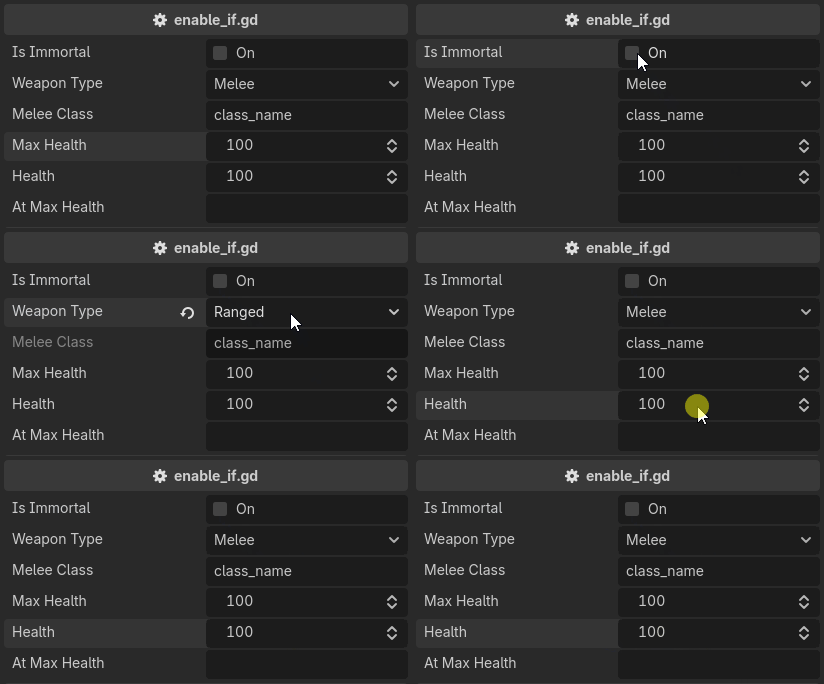
disable_if is enable_if with the condition negated. The two are the same attribute written from either side.
You can have more than one condition. They are ANDed, and &&, ||, ! and parentheses are available inside a single condition as well:
@export_custom(PROPERTY_HINT_NONE, "enable_if:flag_0; enable_if:flag_1")
var enable_if_all: int = 0

@export_custom(PROPERTY_HINT_NONE, "enable_if:flag_0 || flag_1")
var enable_if_any: int = 0
Read-only is a drawing state, not a storage state. Decorators stay lit above a disabled property, and validators keep running on it, so a clamp still applies to a value another property changed.
To make a property read only unconditionally, use read_only.
Make a property read only.
extends Node3D

@export_custom(PROPERTY_HINT_NONE, "read_only")
var read_only: int = 0

@export
var not_read_only: int = 0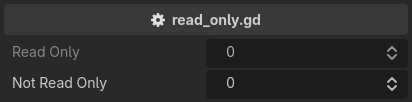
It is enable_if / disable_if with no condition to evaluate, and takes no arguments - anything written after the key is ignored.
A read-only property is greyed out and refuses input in the inspector. Nothing stops the value from being written from code, and validators still run on it.
Override the default property label.
extends Node3D

@export_custom(PROPERTY_HINT_NONE, "label:Maximum Health")
var max_hp: int = 100

@export_custom(PROPERTY_HINT_NONE, "label:Health")
var hp: int = 100

@export_custom(PROPERTY_HINT_NONE, "label:Damage")
var dmg: int = 15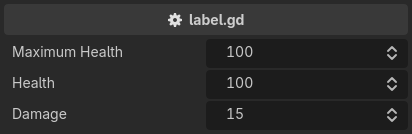
The text takes the rest of the entry whole, so a comma in it needs no escaping. Only a ; has to be written as \;.
The label replaces the one Godot computed, which means it also gives up what Godot did to it: the
@export_groupprefix stripping and the Property Name Style editor setting no longer apply.
Detects a value change and executes a callback. The callback takes the old and the new value.
@tool # required for method calls in attributes
extends Node3D

@export_custom(PROPERTY_HINT_NONE, "on_value_changed:print_value_change")
var strength: int = 10

@export_custom(PROPERTY_HINT_NONE, "on_value_changed:print_value_change")
var dexterity: int = 7

@export_custom(PROPERTY_HINT_NONE, "read_only")
var power: int:
	get:
		return strength * 2 + dexterity


func print_value_change(old_value, new_value):
	print(old_value, " -> ", new_value)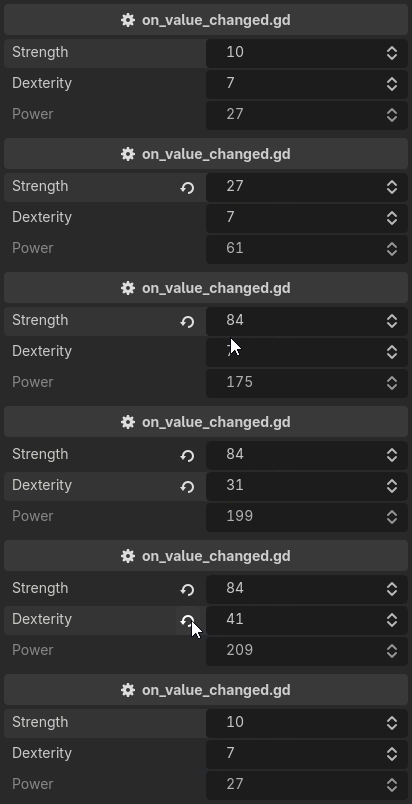
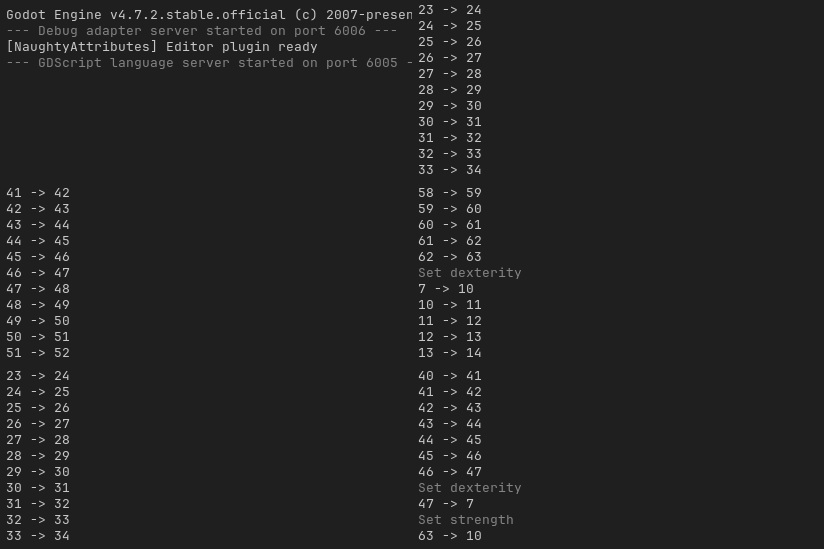
The argument is a method name, without parentheses. Exactly one signature is accepted, (old_value, new_value), and a property can carry more than one callback - they are called in written order.
The callback is a method call, so the script needs
@tool.
Keep in mind that the event fires only when the value is changed from the inspector. Undo and redo restore values silently, and so does a clamp applied when the inspector is first built.
Callbacks run after Godot has committed its own undo action, so they see the new value, and a property a callback writes lands on screen at once.
Used for validating properties. A property can have any number of validator attributes.
A validator has two shapes over one job. It either corrects the value, as min_value / max_value does, or it rejects it and draws a message beside the property, as require does.
Validators run before a property's widget is built, and again across every visible property on every inspector edit, so a property whose bound reads another property re-validates when that one changes. They do not run on a property hidden by
show_if/hide_if.
Can be used to limit the range of a property. Can be applied to int, float, Vector2, Vector3, Vector4, Vector2i, Vector3i and Vector4i. A vector is clamped component-wise.
Both bounds are expressions, so a bound accepts a literal, another property, or a method call, and a bounded property re-clamps when its bound changes.
@tool # required for method calls in attributes
extends Node3D

@export
var min_hp: int = 0
@export
var max_hp: int = 100
@export
var min_ratio: float = 0.25
@export
var max_ratio: float = 0.75

@export_custom(PROPERTY_HINT_NONE, "min_value:min_hp; max_value:max_hp")
var hp: int = 50
@export_custom(PROPERTY_HINT_NONE, "min_value:get_min_ratio(); max_value:get_max_ratio()")
var ratio: float = 0.5
@export_custom(PROPERTY_HINT_NONE, "min_value:0; max_value:1")
var int_min_0_max_1: int = 0
@export_custom(PROPERTY_HINT_NONE, "min_value:0; max_value:1")
var vector3_min_0_max_1: Vector3 = Vector3.ONE * 0.5


func get_min_ratio() -> float:
	return self.min_ratio


func get_max_ratio() -> float:
	return self.max_ratio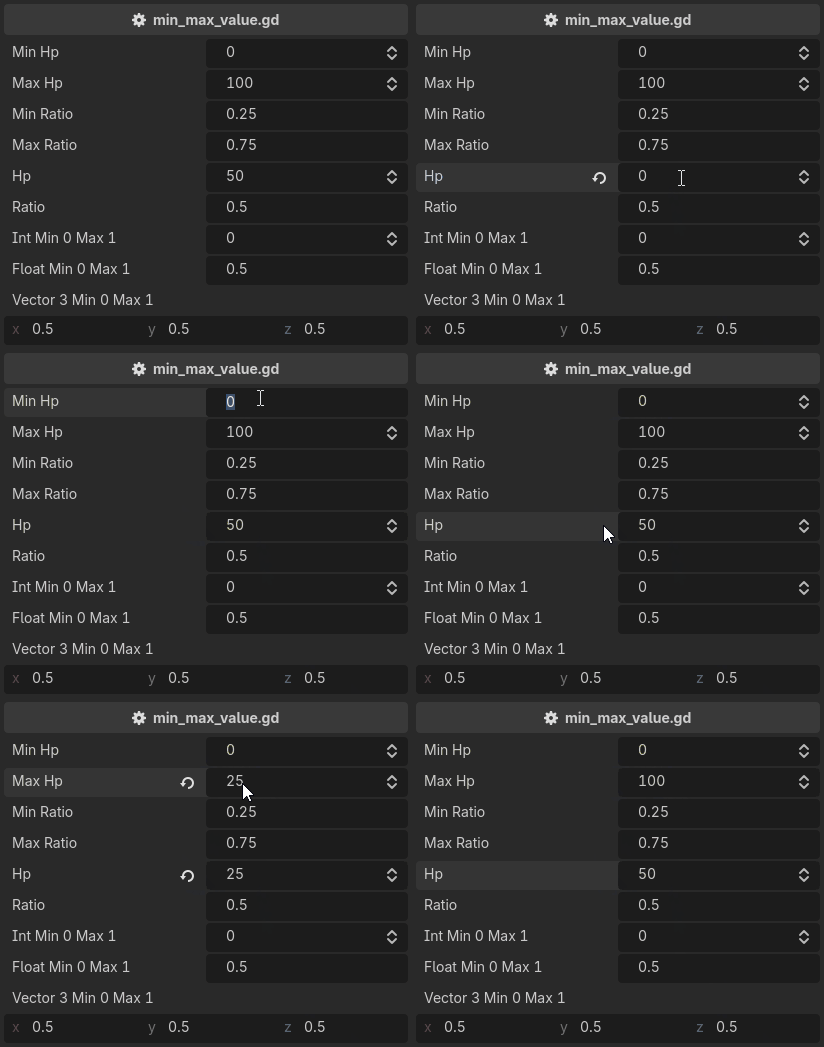
The two are one attribute mirrored, and either can be used on its own.
A correction is written into the value, so it enters the undo history. A drag leaves one undo entry, and undoing it restores what a property held before the drag started, not the value it was clamped to mid-drag.
A contradictory pair such as
min_value:10; max_value:5is not reported. Validators run in written order, so the last one wins, visibly.
For a bound that reports rather than corrects, use require.
The most powerful validator. It takes a boolean expression and draws a message beside the property when the expression is false.
@tool # required for method calls in attributes
extends Node3D

@export
var min_size: int = 4

@export_custom(PROPERTY_HINT_NONE, "require:size >= min_size")
var size: int = 2

@export_custom(PROPERTY_HINT_NONE, "resource_type:Texture2D; require:icon")
var icon: Texture2D

@export_custom(PROPERTY_HINT_NONE, "require:is_even(even_number)")
var even_number: int = 3


func is_even(number: int):
	return number % 2 == 0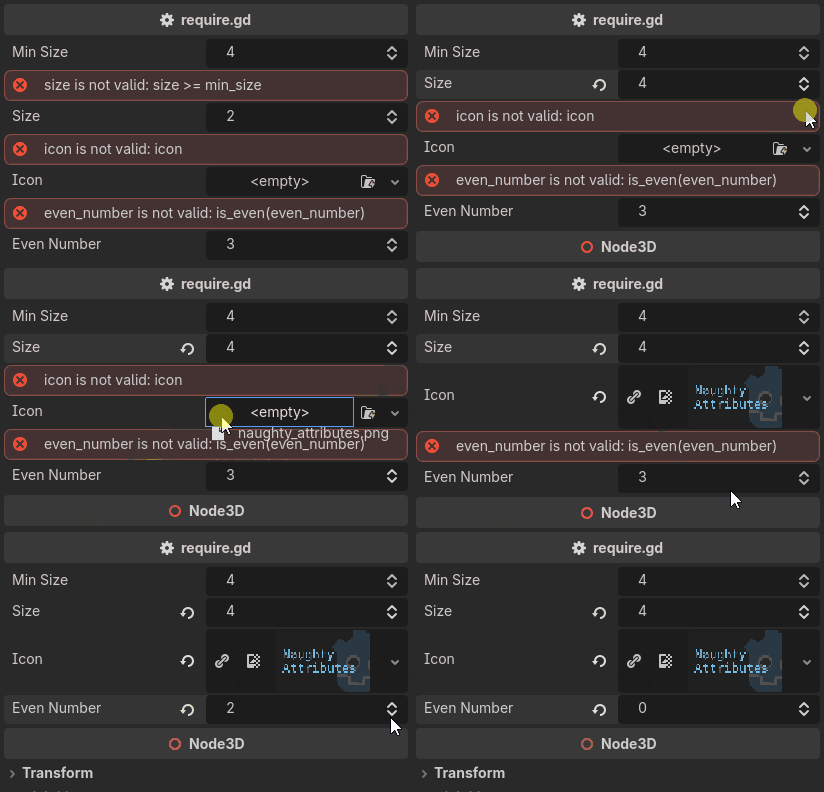
require:icon is a null check through Godot truthiness, require:hp > 0 a bound, and require:is_even(size) a call with the argument written out. It replaces both of Unity's Required and ValidateInput attributes, which are two attributes only because a C# attribute cannot carry an expression.
The message is built from the expression, so there is nothing to write:
size is not valid: size >= min_size
requirecorrects nothing and writes nothing, so it is the one validator that never enters the undo history.
A property that already carries a built-in hint cannot carry attributes, which is why the
iconabove re-encodes its picker asresource_type:Texture2D.
GDScript has no compile-time checking for string attributes, so mistakes are reported loudly instead. Everything goes to the Output panel, prefixed [NaughtyAttributes], in the form:
{script_path}.{property} - {key}: {message}
For example:
[NaughtyAttributes] res://scripts/player.gd.health - min_value: unknown identifier "floor_hp"
A typo names the script, the property and the attribute rather than silently doing nothing.
- An unknown attribute key. It does not claim the property, which is left to Godot.
- An attribute whose arguments do not parse, or whose expression does not compile. The attribute is dropped.
- An expression that fails at evaluation time. A failing condition counts as satisfied, so a property stays visible and enabled, and a validator skips its correction.
- A second drawer attribute on one property, or a second built-in hint in one hint text. The last one wins and the displaced one is reported.
- A callback named by
on_value_changedthat the object cannot call.
A message drawn beside a property by
requireis not an error and is never logged. It is the attribute working as written over wrong data.
If a failing expression contains a call, the message ends with a hint: without
@toolon the script, that the call needs it; with@tool, to check the method's name and arguments.