

flutter_turtle is a simple yet powerful implementation of turtle graphics for Flutter. It leverages Flutter's CustomPainter to draw graphics using a declarative, Logo-like Domain-Specific Language (DSL) written entirely in Dart.
Turtle graphics is a popular method for introducing programming to beginners. It involves a "turtle" (an on-screen cursor) that carries a pen. By giving commands like "move forward," "turn right," and "pen down," you can create complex geometric shapes and intricate patterns. It was a key feature of the Logo programming language and remains a foundational concept in computer science education.
For further information about turtle graphics, please refer to Wikipedia:
Building a Domain-Specific Language (DSL) within Dart is an excellent exercise in API design, and turtle graphics are a universally engaging way to introduce programming concepts through visual feedback!
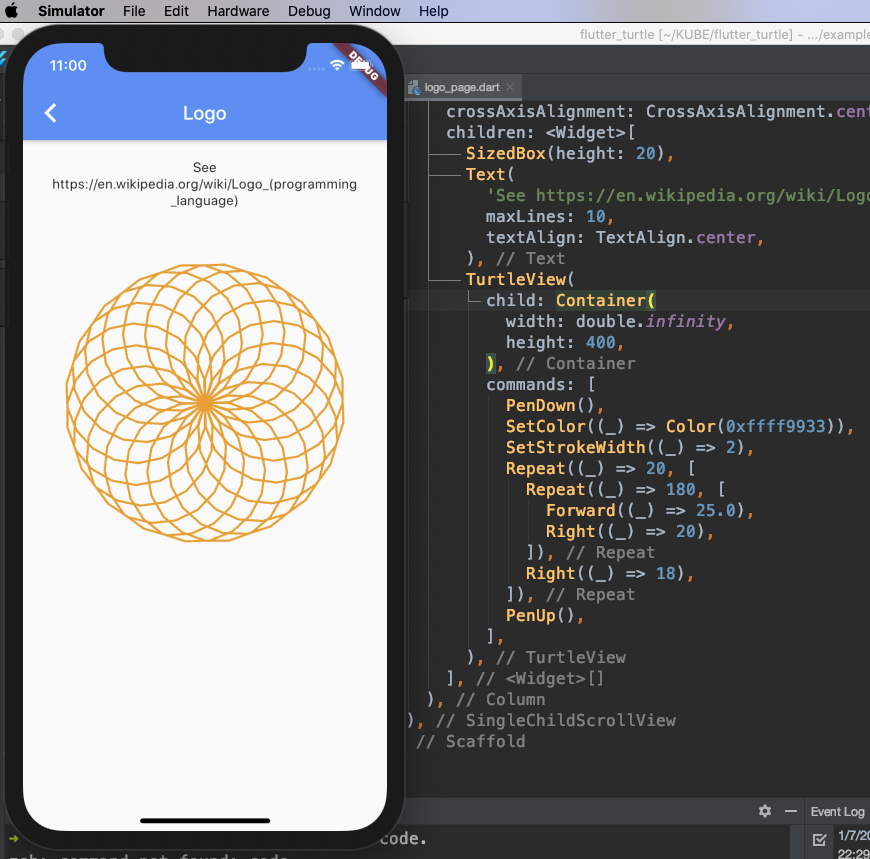
A quick example:
@override
Widget build(BuildContext context) {
  return Scaffold(
    appBar: AppBar(title: Text(widget.title)),
    body: TurtleView(
      child: Container(),
      commands: [
        PenDown(),
        SetColor((_) => Color(0xffff9933)),
        SetStrokeWidth((_) => 2),
        Repeat((_) => 20, [
          Repeat((_) => 180, [
            Forward((_) => 25.0),
            Right((_) => 20),
          ]),
          Right((_) => 18),
        ]),
        PenUp(),
      ],
    ),
  );
}
A Flutter web app example is available at https://zonble.github.io/flutter_turtle/
flutter_turtle provides two core visualization widgets:
TurtleView: Serves as your canvas and immediately renders the fully evaluated graphics based on the provided commands.AnimatedTurtleView: An animated variant that sequentially visualizes the turtle's drawing process over time.
To use them, simply instantiate TurtleView or AnimatedTurtleView, pass your declarative commands via the commands parameter, and embed the widget directly into your Flutter widget tree.
flutter_turtle is built to be efficient, extensible, and seamlessly integrated into Flutter's rendering pipeline. The architecture is primarily divided into three stages: the DSL Command Definition, the Compiler, and the Painter.
The library provides a set of classes (e.g., Forward, Right, Repeat, IfElse) that represent Logo-like instructions. Unlike a traditional interpreter that reads a text script, the DSL is constructed using native Dart objects. This provides full type safety, code completion, and allows you to seamlessly mix Flutter logic (like using Flutter Color or BuildContext state) directly into your turtle commands.
Before any graphics are drawn, the tree of nested TurtleCommand objects is processed by the TurtleCompiler. The compiler evaluates flow-control commands (Repeat, If, IfElse) and flattens the execution tree into a linear sequence of atomic Instruction objects.
- Macros: Macros are managed during compilation. A
SetMacrocommand registers a sub-tree of commands, which are injected and compiled in place whenever aRunMacrocommand is encountered. - State Management: While compiling, the framework does not draw anything. It simply prepares a highly optimized sequence of operations.
The actual drawing happens inside TurtlePainter, which is a CustomPainter implementation.
TurtlePainterreceives the compiled list ofInstructionobjects.- It initializes a
PaintContext(providing access to theCanvasandPaintobjects) and aTurtleState(which tracks the turtle'sposition,degrees,isPenDownstatus, colors, and line widths). - As
TurtlePainteriterates through the instructions, each instruction executes against thePaintContext, mutating the state and calling rawCanvasdrawing methods.
AnimatedTurtleView leverages Flutter's AnimationController and AnimatedBuilder. When built, it calculates the total number of compiled instructions. As the animation progresses from 0.0 to 1.0, the widget progressively passes a growing sublist of instructions (e.g., from index 0 to total_instructions * animation.value) to the TurtlePainter. This simple yet effective approach smoothly simulates real-time drawing without requiring complex frame-by-frame state serialization.
If you have Logo code like this:
repeat 5 [ fd 100 rt 144 ]
The equivalent code in the Flutter Turtle DSL would be:
[
  Repeat((_) => 5, [
    Forward((_) => 200),
    Right((_) => 144),
  ]),
];
Flow control commands are evaluated dynamically during compilation. You can use the IfElse class just like an if...else statement in Dart, and the Repeat class for loops.
An example of IfElse:
// If the condition evaluates to true, move forward; otherwise, move backward.
IfElse((_) => true, [Forward((_) => 10.0)], [Back(() => 10.0)]),
An example of Repeat:
// Repeat the inner commands 10 times.
Repeat((_) => 10, [Forward((_) => 10.0)]),While the DSL does not support traditional named functions natively, you can achieve reusable components using macros. Use the SetMacro command to register a parameterized block of commands:
SetMacro('macro', [Forward((_) => 10.0)]), // Registers a new macro named "macro".You can then execute the macro dynamically using the RunMacro command:
RunMacro('macro', (_) => {'arg1': 'value1', 'arg2': 'value2'}),You can pass arguments when calling a macro. These arguments are provided as a Dart Map and are accessible via the callback parameter _ to every command within the macro. For example:
SetMacro('macro', [Forward((_) => _['arg1'])]), // Uses the "arg1" value from the arguments map.
RunMacro('macro', (_) => {'arg1': 10.0}),The currently supported primitives and logic structures include:
PenDownPenUpLeftRightForwardBackSetColorSetStrokeWidthGoToResetPositionResetHeadingLabelSetLabelHeight
IfIfElseRepeat
SetMacroRunMacro