



FreeCleaner is a lightweight Windows desktop utility focused on cleaning temporary and non-essential files in a simple, clear, and privacy-friendly way.
The project is designed around a local-first workflow, understandable actions, and a clean desktop experience without unnecessary clutter.
FreeCleaner helps users remove junk data, temporary files, and other low-value leftovers that build up over time on Windows systems.
The main goal of the project is not to become a bloated "all-in-one miracle optimizer," but to stay:
- simple
- readable
- local-first
- user-controlled
- practical for everyday use
- Clean temporary and non-essential files
- Simple desktop interface
- Local-first workflow
- Privacy-friendly design
- Built-in access to bundled project documents
- Support for custom language packs
- Lightweight structure focused on clarity and usability
Many cleanup tools become overloaded with ads, confusing controls, background behavior, or unnecessary features.
FreeCleaner is built with a different approach:
- predictable behavior
- clear interface
- understandable cleanup actions
- no intentional hidden data collection
- easier customization and localization
In short: it tries to clean the PC, not the user’s patience.
Add your screenshots here after publishing visuals for the project.
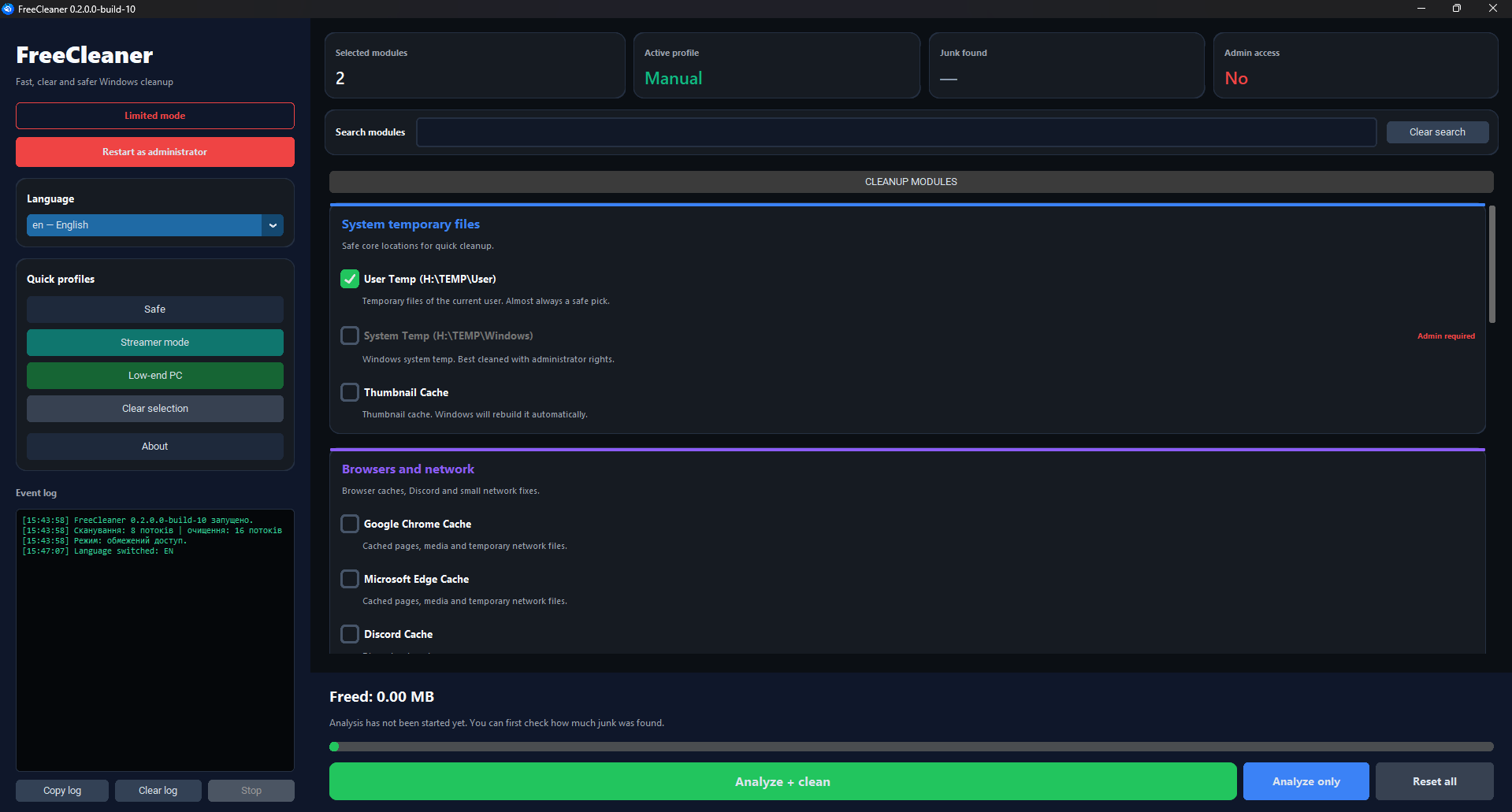
A typical structure may look like this:
FreeCleaner/
├─ app.py
├─ freecleaner/
│  ├─ app.py
│  ├─ design.py
│  ├─ logic.py
│  ├─ version_info.py
│  └─ ...
├─ languages/
│  └─ *.json
├─ assets/
│  ├─ icons/
│  └─ screenshots/
├─ LICENSE
├─ PRIVACY_POLICY.txt
└─ README.md
- Windows 10 or Windows 11
- Python 3.x
- Project dependencies required by the application
Make sure Python is installed, then run:
python app.pyIf the entry point is different in your setup, run the correct startup file for your project.
If the project includes a requirements file:
pip install -r requirements.txtIf not, install the dependencies manually according to the project modules you use.
If you package FreeCleaner into an .exe, make sure all required assets are included:
- icons
- language files
LICENSEPRIVACY_POLICY.txt- images and other UI resources
Example with PyInstaller:
pyinstaller app.specOr:
pyinstaller --noconfirm --onefile --windowed app.pyAdjust the command to fit your real project structure.
FreeCleaner supports external JSON language files.
Each custom language file should include a NAME field used as the visible language name in the UI.
Example:
{
  "NAME": "English",
  "app_title": "FreeCleaner",
  "close": "Close"
}- Built-in languages may be handled separately from external ones
- External language files should be placed in the correct language folder next to the application
- Translation keys should stay consistent with the application’s expected structure
- User-friendly naming is recommended for public distributions
FreeCleaner includes bundled project documents that can be opened from the application:
- LICENSE — explains how the software may be used and distributed
- PRIVACY_POLICY.txt — explains what the app does and does not do with user data
FreeCleaner is designed to work locally on the user’s PC.
It does not intentionally upload personal files, cleanup results, or private documents to external servers.
Typical operations are performed locally and only for the cleanup actions selected by the user.
For more details, see:
PRIVACY_POLICY.txtLICENSE
- Local first — cleanup happens on the user’s device
- User control — the user decides what to run
- Clear UI — no hidden magic and no unnecessary clutter
- Readable documentation — bundled documents are easy to access
- Extensible languages — translations can be added through JSON files
Current development priorities include:
- improving UI clarity
- improving rendering performance
- refining cleanup flows
- making language support easier to maintain
- keeping the project lightweight and understandable
FreeCleaner is not intended to be:
- a cloud sync utility
- a remote monitoring tool
- an antivirus
- a full replacement for professional enterprise maintenance tools
It is a focused desktop cleanup utility.
No. FreeCleaner is designed as a local-first desktop utility and is not intended to upload your personal files as part of normal usage.
No. FreeCleaner does not require an account for local use.
Yes. External JSON language packs can be added if they follow the expected translation key structure.
It is designed to be simple and transparent, but users should always review cleanup actions before confirming deletion.
Yes. A packaged executable can be built with tools such as PyInstaller, as long as required resources are included.
Contributions, improvements, bug reports, UI suggestions, and translation updates are welcome.
You can contribute by:
- reporting bugs
- improving translations
- refining the interface
- optimizing performance
- improving documentation
This project is licensed under the MIT License.
See the LICENSE file for details.
FreeCleaner supports both Windows x86 and x64 targets:
*-win32.exeis built with 32-bit Python and is intended for 32-bit Windows and older Windows 7 installations.*-win64.exeis built with 64-bit Python and is intended for 64-bit Windows 7/8/8.1/10/11.
The application also detects whether it is running as a 32-bit process on 64-bit Windows (WOW64), so path discovery can correctly distinguish native x64, native x86, and WOW64 environments.
The release workflow now produces both portable EXE files and installable setup files:
FreeCleaner-<version>-win32.exe— portable 32-bit executable.FreeCleaner-<version>-win64.exe— portable 64-bit executable.FreeCleaner-<version>-win32-setup.exe— installer for 32-bit Windows and compatible 64-bit systems.FreeCleaner-<version>-win64-setup.exe— installer for 64-bit Windows only.
The installer is built with Inno Setup and includes:
- installation into
Program Files/Program Files (x86)depending on architecture; - Start Menu shortcut;
- optional Desktop shortcut;
- uninstall entry in Windows “Programs and Features”;
- license page;
- admin privileges, because cleaner functions need system-level access.
Manual installer build after PyInstaller:
.\scripts\build_installer.ps1 `
  -ExePath "dist\FreeCleaner-0.2.0.0-build-1-win64.exe" `
  -Arch "win64" `
  -Version "0.2.0.0-build-1" `
-OutputDir "dist"The in-app updater selects the installer by the current Windows architecture:
- 32-bit Windows downloads
FreeCleaner-<version>-win32-setup.exe. - 64-bit Windows downloads
FreeCleaner-<version>-win64-setup.exe. - If the native x64 installer is missing, 64-bit Windows can fall back to
FreeCleaner-<version>-win32-setup.exebecause the 32-bit installer is compatible.
The updater avoids downloading an incompatible win64-setup.exe on 32-bit Windows.
FreeCleaner now chooses worker counts dynamically instead of using fixed limits:
- Scan starts around half of logical CPU threads because scanning is mostly disk-bound.
- Cleaning starts at logical CPU threads minus two to keep Windows responsive.
- During work, each batch re-checks CPU and RAM pressure through Windows APIs and reduces workers on loaded systems.
- No extra runtime dependency is required; the logic remains compatible with Python 3.8 and Windows 7-11.